

URL TO PDF
What Is URL to PDF and How Does It Work?
A simple guide explaining how URL to PDF tools convert public webpages into clean, downloadable PDF files.
INTRODUCTION
The internet contains a huge amount of useful information, but webpages are not always easy to store, share, or print in a clean format. Sometimes you need an offline copy of a report, article, invoice, research page, documentation file, or public webpage. This is where URL to PDF conversion becomes useful.
KhanPDF allows users to convert public links into high-quality PDF documents directly from the browser. Instead of copying content manually or taking screenshots, the system automatically generates a clean downloadable PDF from the webpage URL.
What Is URL to PDF Conversion?
URL to PDF conversion is the process of taking a public webpage and transforming it into a PDF document. The tool loads the webpage, captures its visible structure and content, and creates a downloadable PDF version.
This approach is useful because PDFs are easier to archive, print, share, and access offline. Businesses, students, developers, researchers, and content teams often need a reliable way to save web content in a portable document format.
Unlike screenshots, PDF conversion preserves readable text formatting and creates a more professional document structure.
Why People Use URL to PDF Tools
Many users need to save webpages for future reference. Documentation pages may change over time. Articles can disappear. Reports may need to be shared internally. Teams often need static versions of online content.
A URL to PDF tool helps solve these problems by generating a permanent copy of the webpage.
Common use cases include:
- Saving blog articles
- Exporting documentation pages
- Storing invoices or reports
- Creating offline reading copies
- Sharing webpages in meetings
- Archiving public information
- Generating printable versions of content
How KhanPDF Works
KhanPDF simplifies the entire process into a few steps.
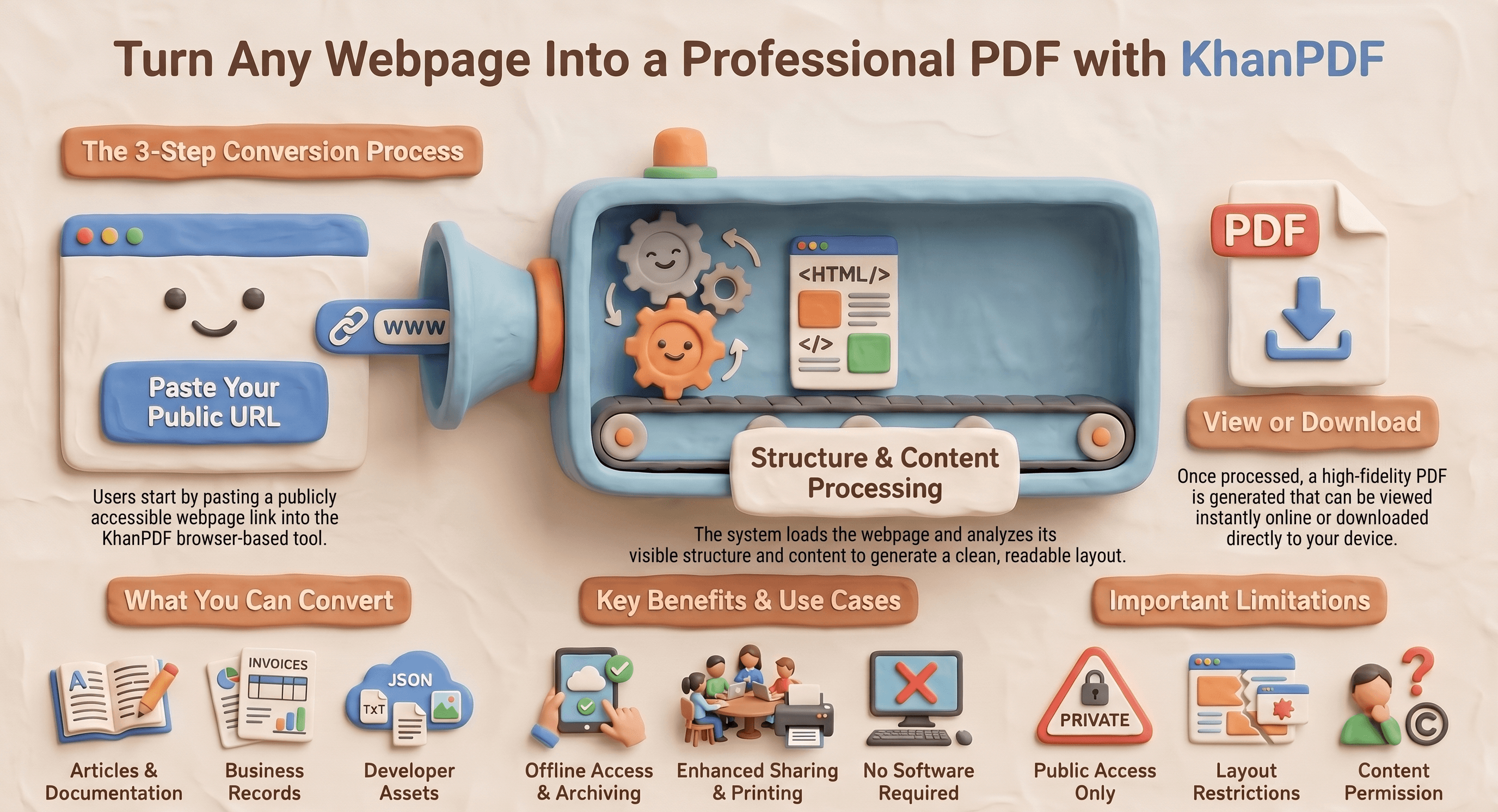
First, the user copies a public webpage URL. The URL is then submitted to the conversion engine. The system loads the webpage content, processes the page structure, and generates a downloadable PDF file.
Once the conversion is complete, the PDF can be viewed online or downloaded directly.
The system is designed to work with many common public webpage formats including blogs, documentation pages, public HTML pages, reports, and public text-based resources.
Supported URL Types
KhanPDF supports many types of public URLs, including:
- Blog posts
- Articles
- Documentation pages
- Public reports
- HTML pages
- Public JSON endpoints
- Public text files
- Image URLs
- Landing pages
However, some webpages may not convert correctly.
Examples include:
- Login-protected pages
- Private dashboards
- Blocked websites
- Broken links
- Pages requiring authentication
- Highly dynamic JavaScript-heavy pages
For best results, users should use publicly accessible webpages with stable layouts.
Benefits of Saving Webpages as PDFs
Saving webpages as PDFs provides several advantages.
Offline Access
PDF files can be opened without an internet connection. This makes them useful for travel, presentations, and long-term storage.
Better Sharing
PDF documents are easier to share through email, messaging apps, and business workflows.
Printing Support
A PDF version is usually cleaner and more printer-friendly than printing directly from a browser.
Long-Term Storage
Webpages can change or disappear over time. PDFs provide a stable snapshot of the content.
Professional Formatting
PDF files maintain a structured document format that is easier to read and distribute.
Best Practices for Better PDF Results
To generate cleaner PDFs, users should follow a few best practices.
Use public webpages with readable layouts. Avoid pages that contain aggressive popups, authentication barriers, or broken scripts. Pages with extremely heavy animations or dynamic loading may produce inconsistent output.
It is also recommended to wait until the webpage is fully loaded before conversion if the page relies on asynchronous content loading.
KhanPDF Use Cases
KhanPDF can be used across many industries and workflows.
Students and Researchers
Students often save articles, references, and academic resources for offline reading.
Developers
Developers frequently export documentation pages, API references, and technical guides.
Businesses
Companies may archive reports, webpages, invoices, or online records as PDFs.
Marketing Teams
Marketing teams can store landing pages, campaign previews, or competitor research.
Remote Teams
Distributed teams can share static PDF copies of important online resources.
Security and Accessibility
KhanPDF only works with publicly accessible URLs. The system does not bypass login pages, private dashboards, password-protected content, or restricted websites. This keeps the conversion process safe, predictable, and focused on content that is already available on the public web.
Users should also make sure they have permission to save, share, or distribute any webpage they convert. URL to PDF conversion is useful for personal reference, business documentation, research, and archiving, but the original content rights should always be respected.
When URL to PDF Conversion Is Most Useful
URL to PDF conversion is especially helpful when you need a clean and permanent copy of online content. For example, you may want to save a technical guide before it changes, download a public report for offline reading, keep a copy of an invoice, or share a webpage with a team member who does not need to open the original link.
It also helps when browser printing does not produce a clean layout. Instead of dealing with broken formatting, missing sections, or messy screenshots, a dedicated converter can create a more readable PDF document.
Final Thoughts
Webpages are useful, but they are not always easy to save, organize, print, or share. A PDF gives you a stable version of the page that can be stored, downloaded, emailed, printed, or accessed later without depending on the original webpage.
KhanPDF makes this process simple by allowing users to convert public URLs into downloadable PDF documents directly from the browser. Whether you are saving research, exporting documentation, archiving reports, or creating offline copies of important webpages, KhanPDF gives you a fast and practical way to turn online content into clean PDF files.
To get started, open the URL to PDF tool, paste your webpage link, and generate your PDF in just a few steps.
FAQ
Frequently asked questions
Ready to try it yourself?
Convert, compress, and craft PDFs with KhanPDF — fast, free, fidelity-first.
Convert URL to PDF